HELPFUL RESOURCES

Find many helpful resources here that you can use in the process of creating your autobiography, personal or family history book. Many of these resources are available right here in LifeHistoryApp.com. You will also find additional resources here that are sponsored outside our app. Take advantage of these internal and external resources to make your life history more meaningful for those who come after you. For example, you may want to access www.FamilySearch.com to access photos, stories, and pedigree and fan charts for your family.


Contact Us

Guide to Help You Write Your Personal History or Autobiography

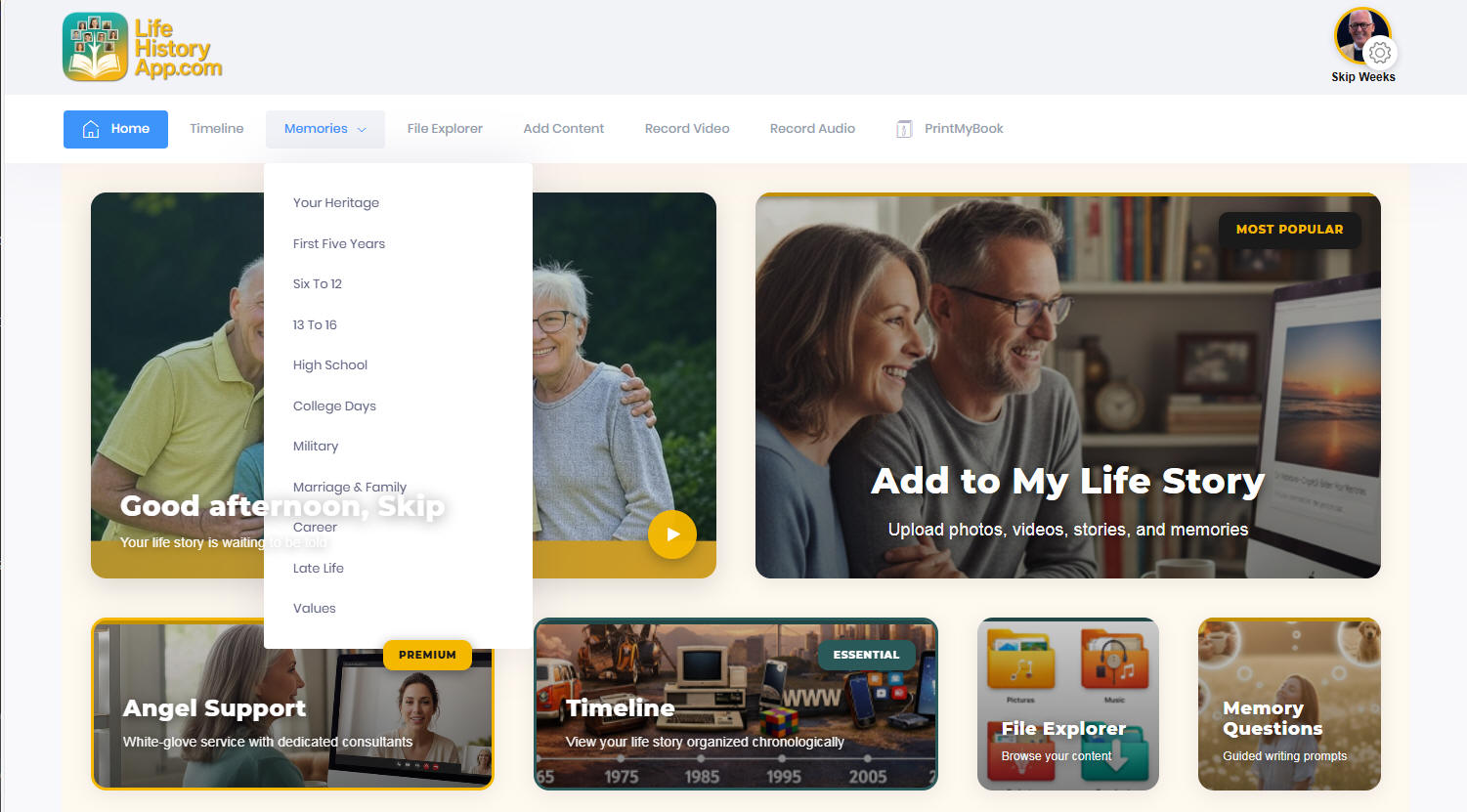
One of the most helpful tools we provide is our Memories section, which provides you with lots of questions about your life, organized in 11 different chronogical categories. You can access these questions and memory joggers after you register and login.


Eleven Phases of Your Life Memories


ADD NEW CONTENT TO YOUR PRIVATE WORKSPACE 

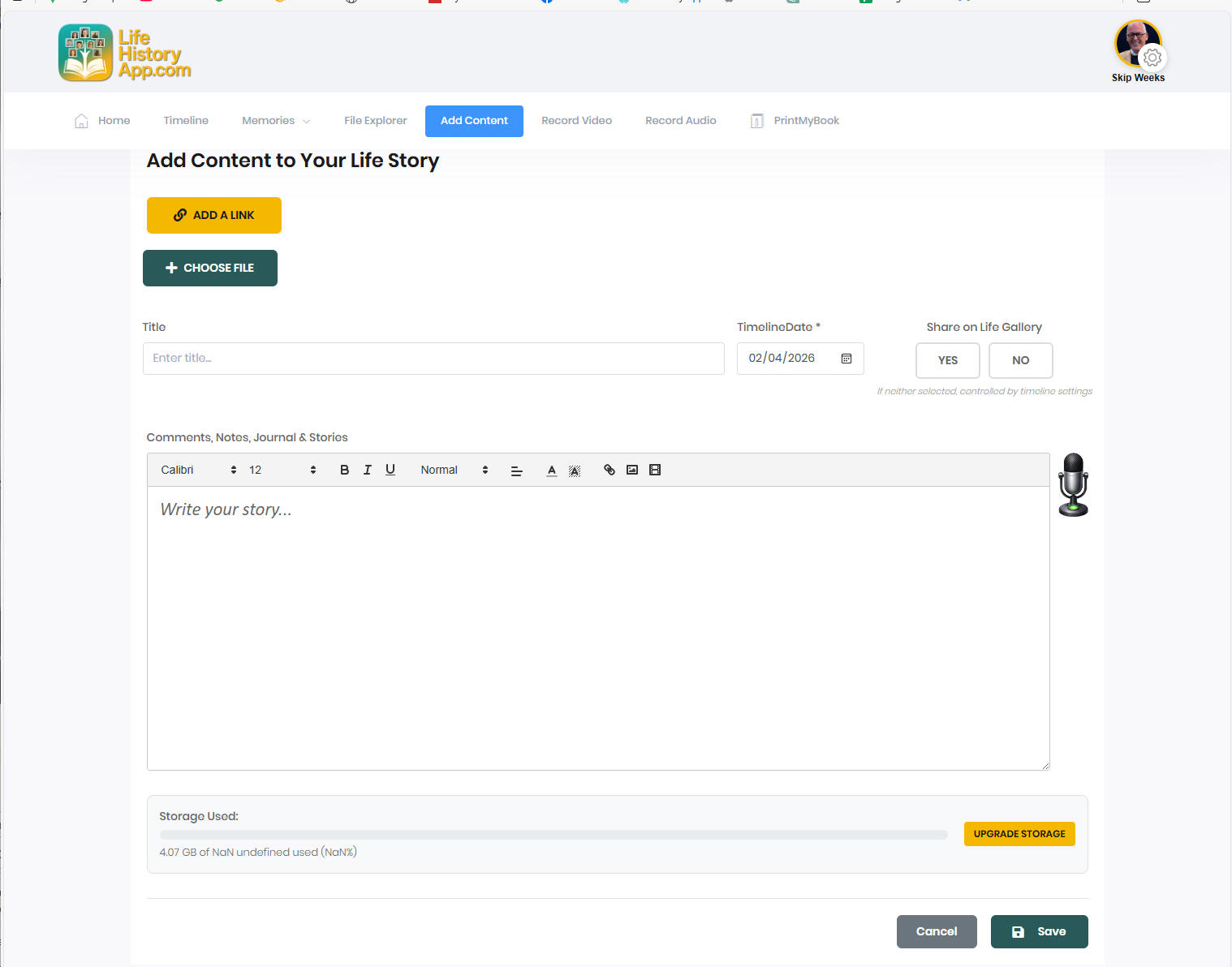
The ADD NEW CONTENT option is the heart of the LifeHistoryApp. Here you can upload files that you want to include in your life history or autobiography, like photos, or even add an external link to YouTube or another website or page that should be included in your digital history project. Note that whenever you add new content you will be prompted to enter a title and a timeline date for each content element. This tells the system where you want each element to appear in the timeline of your life and what headline to display for each section.

This is also a great place to journal or write the stories of your life. It's great to include a scanned photo for each section that you write about. .


Add Content to Your Life Story


ELLA AI WRITING ASSISTANCE 

One of the extraordinary features of LifeHistoryApp is our Ella AI Writing Assistant. You receive three free ELLA AI writing assists each month or you can upgrade for UNLIMITED writing assistance for just $20 per month.


ELLA AI WRITING ASSISTANCE

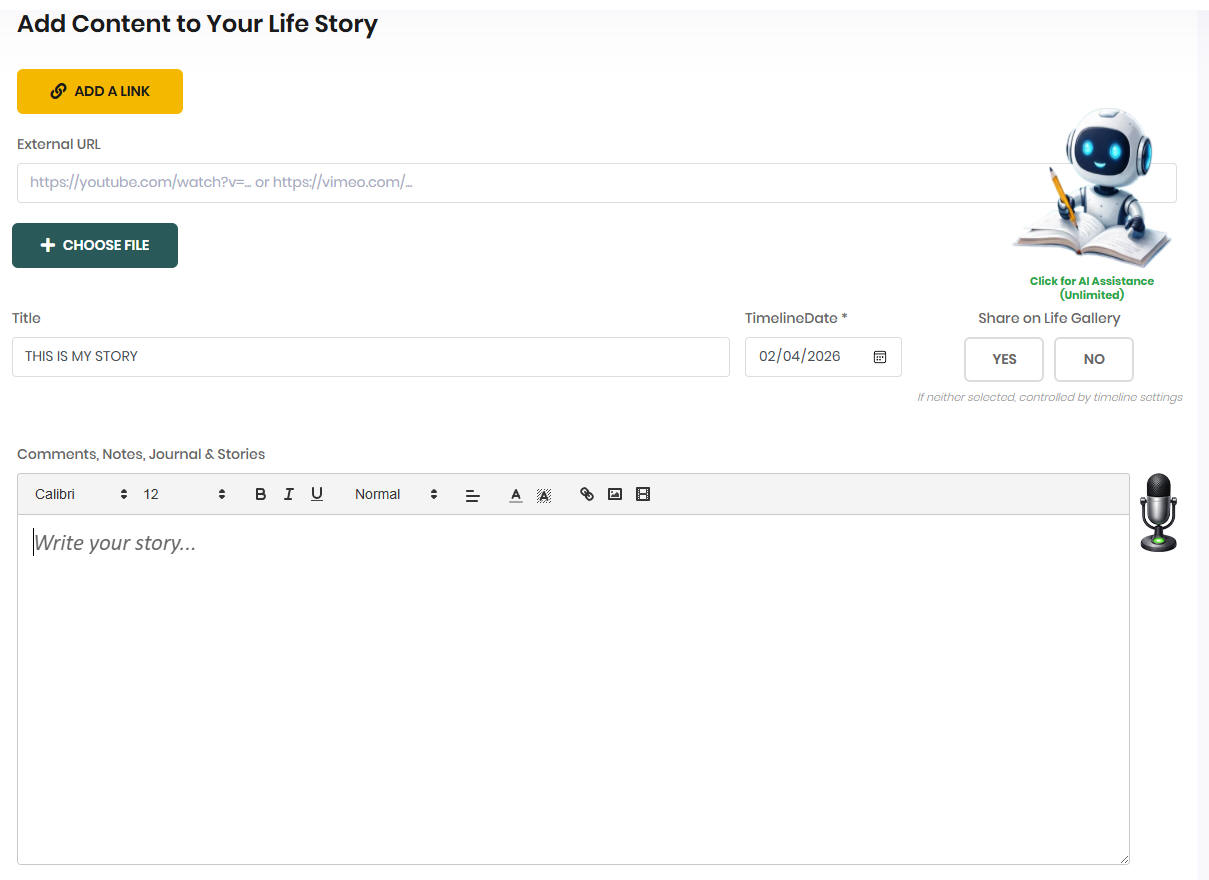
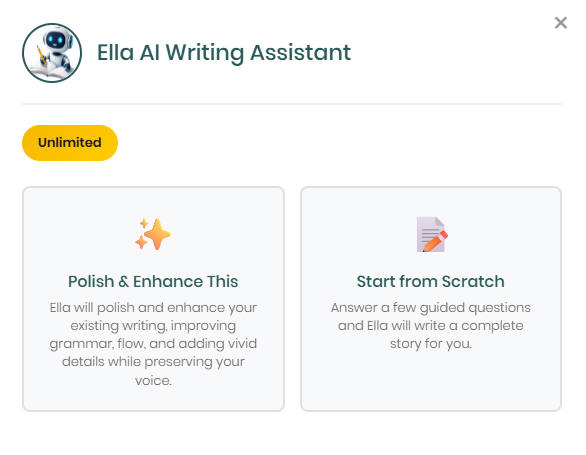
The moment your cursor lands in the Comments, Notes, Journal & Stories section Ella AI appears. To access this powerful feature, simple click on the Ella AI icon. and the options are presented.

Ella AI Options

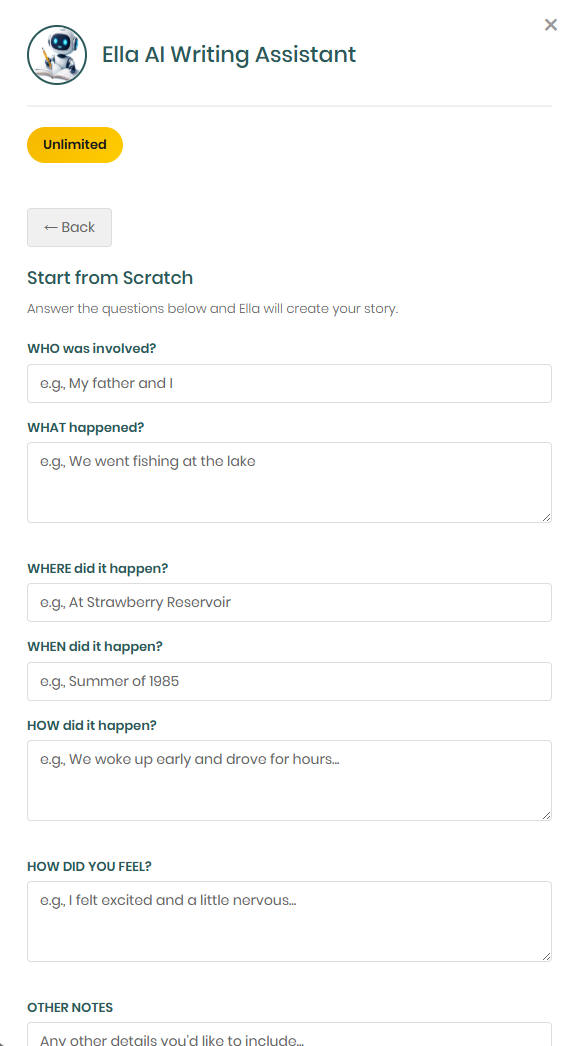
Selecting Polish & Enhance will polish and enhance your existing writing, improving grammar, flow, and adding vivid details while preserting your own voice in the writing. Choosing the START FROM SCRATCH option displays a series of questions about the experience that you want to document:

Start From Scratch


After Ella AI has updated, you can review the output and if you like it you can confirm that you want to use.
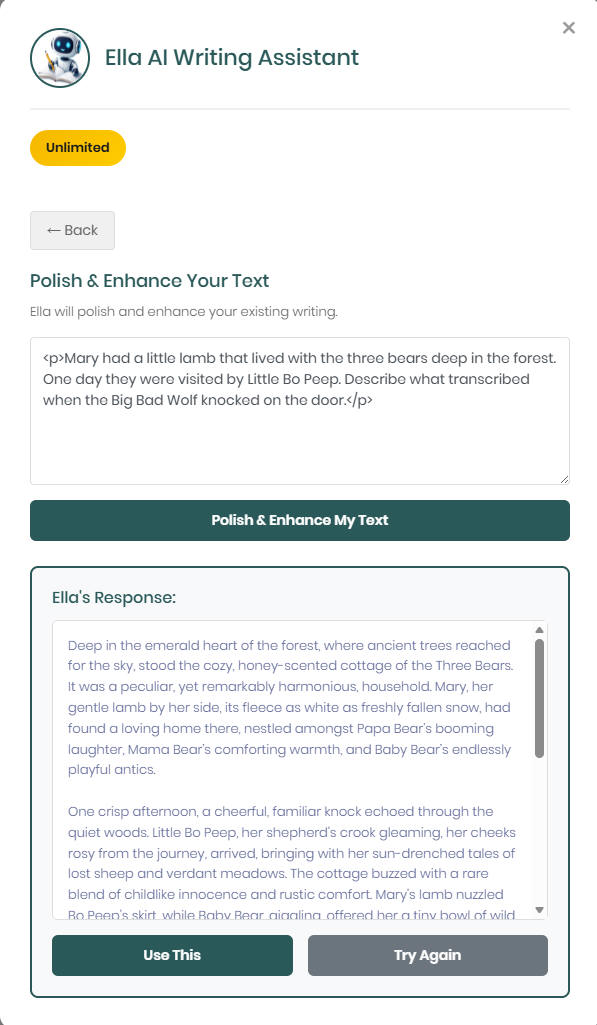
 

Choose to use the ELLA AI Edit

You are going to love how this exciting tool can streamline your biography and help you ensure that your grammar and punctuation is perfect in every story.


INSTANT VOICE TO TEXT TRANSCRIPTION 

                                                      Voice Recording

Another powerful and helpful feature of LifeHistoryApp is the Voice to Text capability built in to the editor. To use it, simply click on the microphone on the right of the comments field and start talking. Of course, you will need to have a microphone attached and working on your computer, tablet, or phone. Just click on the microphone icon with the green "ready" button. To stop the transcription, just click on the microphone showing the red "recording" button. Be aware that you need to be using Google Chrome, Microsoft Edge, or Safari browsers for this handy feature to function properly. Be aware that on your smartphone, you can use the native microphone feature while in any field to also record as you speak.


JOURNALING & STORY TELLING 

Part of the ADD NEW CONTENT screen is the COMMENTS or JOURNALING section. Here you can type stories about your life that you want to include in your life history or autobiography, like photos, or even add an external link to YouTube or another website or page that should be included in your digital history. Note that whenever you add a new journal entry or comment that you will be prompted to enter a title and a timeline date for each content element. This tells the system where you want each element to appear in the timeline of your life and what headline to display for each section. You can also upload a photo, video, or external link to be associated with each journal entry.


THE EDITOR

Our editor makes it easy to create beautiful text. Here are the tools available in the header of the editor:


STYLES

You can highlight text and select any of these pre-defined styles to apply to the selected text.


FONTS

You can select San Serif, Serific, or Monospace font for your text.


BOLD, ITALIC, or UNDERLINE


You can highlight any section of text and choose Bold, Italic, or Underline for the selected text.


FONT COLORS

You can highlight any section of text and choose a color for the selected text.


BACKGROUND COLORS

Select any text and click to change the background color of the selected text.


NUMBERED LIST

Highlighting any text, then clicking on this icon will create a numbered list for you.    


BULLETED LIST


Highlighting any text, then clicking on this icon will create a bulleted list.


JUSTIFICATION


After selecting any text you can click on this icon to change the justification from left, to centered, to right, to left and right.


HYPERLINK

The hyperlink tool will enable you to insert a hyperlink to any website, webpage, YouTube video, or Vimeo video. Simply bring up the page you want to link to in a separate browser window and cut and paste the URL (Universal Resource Locator) web address from the address bar to this Enter Link box. A URL will be inserted into your story at the insertion point. This hyperlink tool can also be used in conjunction with the image tool we will discuss next. 


IMAGE INSERT TOOL

The image insert tool will enable you to insert external images into your biography. To use this tool, position your cursor in your story where you want to insert the image. Then click on the IMAGE INSERT TOOL. This will present a field where you can choose an image file from your computer or paste the link to any external image on the Internet.

For an image from your computer, simply click on the INSERT IMAGE TOOL, then browse your computer to find the image you want to insert and click on the image and it will be uploaded and appear in your document at the position where your cursor is located.

To display an image from the Internet, if you want to display a photo of Robin Williams in your story, search for the image you want, then right mouse click on the image and COPY THE LOCATION. The link will look like this:


https://vignette.wikia.nocookie.net/snl/images/4/4d/Robin_Williams.jpg/revision/latest/scale-to-width-down/250?cb=20180722094310


Then click on the IMAGE INSERT TOOL and paste the link for the image in the File Name field and click on OPEN and the image will appear in your document.


NOTE: After an image has been inserted into your document you can use the HYPERLINK tool to link the image to another website or web page. Do this my clicking on the image for which you want to create a link, then click on the HYPERLINK icon. This will provide a field where you can paste the link that you want to use.


ADDING AN EXTERNAL LINK OR YOUTUBE VIDEO
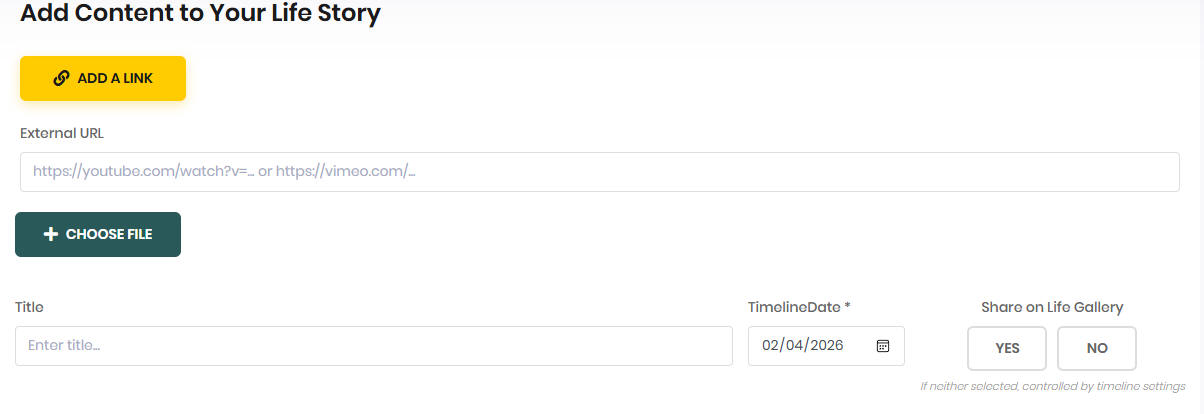
 

Adding a Video

Clicking on the ADD A LINK Gold button will open a field where you can paste the YouTube Share link provided. You can also paste a link to a website here that you want to include in your story.


YOUR PERSONAL BIOGRAPHER 

We can ghostwrite your biography for you. Then we will create a beautiful book for you including your life story and all the photos you want to include. We can even scan your photos for you and color correct them and retouch old faded images that need help to look their best. We can interview you by phone, via webcam like Zoom or in person in your home or business. We make it fun and easy to tell your unique story. You can simply relax and we manage the entire process for you from beginning to end by our expert team of professional writers, editors, and page/book layout experts.


The first thing we do is match you up with a carefully curated professional personal history writer. You can meet them and decide if you feel like the chemistry is right to work together.


The next thing we do is schedule a time and method to interview you and begin writing your unique story. This can be done however you like. It's a fun process that goes through the significant events in your life. We provide lots of ideas to help you target the most meaningful experiences that you want to include.


Then we help you curate the treasured photos that you want to include in your book. We scan them for you, if needed, and we work with you to decide where you want to insert these important images in your book. When the book is done we will provide you with a draft copy that you can review before we go to print.


When you are satisfied with the book we will print and bind it in leather, high-gloss photo cover, or however you want it on acid-free high quality paper. You simply tell us how many copies you want and we take care of everything else.


These ghostwriting projects are completed on a time and materials basis so you can pay as you go on a weekly basis until your book is completed and printed. Let us know if you have any additional questions.


Financing available through affirm.


*$115/mo. based on a $1900 simplified biography with a 18 month term and 10% APR. Financing through our partner Affirm for qualified candidates. APR options from 0% for 6 months term or 10-30% for 18 or 36 month terms depending on soft credit check. No late fees.


PHOTO BOOKS

After you organize all your photos and the stories and content that you want to include in your family picture book you can choose a template below to start your photo book.


OTHER TOOLS THAT YOU CAN USE TO CREATE YOUR BOOK


Ancestry.com Ancestry.com LLC is a privately held online company based in Lehi, Utah. The largest for-profit genealogy company in the world, it operates a network of genealogical, historical records, and related genetic genealogy websites.

Dragon Naturally Speaking converts your speech to text. There is no better way to get more done on your PC simply by speaking than with Dragon Naturally Speaking, the most intelligent speech recognition solution available. Designed using Nuance Deep Learning technology, Dragon quickly transcribes words into text 3x faster than typing with up to 99% recognition accuracy. Dictate historical interviews and Dragon will convert the recorded words into text for your book.

FamilySearch.org FamilySearch is a nonprofit organization and website offering genealogical records, education, and software. It is operated by The Church of Jesus Christ of Latter-day Saints (LDS Church), and is closely connected with the Family History Department of the church.

Grammerly is the World's Most Accurate Online Grammar Checker. It is Free! Easily improve any text. Eliminate grammar errors. Services: Advanced Grammar Rules, Contextual Spell Checker, Vocabulary Enhancement, Plagiarism Checker, Corrects Writing Mistakes. A great tool to run your personal history through before you print it or share it with others.

HouseOfNames.com is a great place to research your family crest or coat of arms and find digital and other items with your family crest printed on them.


LegacyBox Legacybox sends you an empty box which you fill with tapes, film, photos, and audio recordings. You send it back through UPS. Upon delivery, they digitize your moments onto thumb drive, the cloud, or DVD. They provide tracking, barcoding, and real-time updates throughout the digitizing process.


Otter.ai Otter.ai is a web application which provides speech to text transcription. Otter converts live speaking into a written transcription. This tool can be helpful when you want to transcribe historical interviews in real time. You can use this application on their website or through their iOS and Android apps.

  ScanMyPhotos  ScanMyPhotos.com uses cutting edge technology and a team of trained professionals to offer photo, negative, and slide scanning, video and film transfer, and photo restoration services to millions of customers around the world.   Order Prepaid Photo Scanning Box For As Low As $145!

This site shows you how to get all of your fading prints, slides and negatives into your computer and then combine them with your newer digital camera photographs to make one perfect collection you'll be proud to hand down. You will find lots of helpful tips to get your photos ready to upload to your LifeHistoryApp.com workspace!

Zoom.us Slack is a collaboration hub that can replace email to help you and your team work together seamlessly. It's designed to support the way people naturally work together, so you can collaborate with people online as efficiently as you do face-to-face. Slack is a great tool for families or groups who are working together on a personal or family history project together.

Zoom.us is a Video Communications company headquartered in San Jose, California that provides remote conferencing services using cloud computing. Zoom offers communications software that combines video conferencing, online meetings, chat, and mobile collaboration. This is a great tool for web conferencing if you need to communicate face-to-face with others remotely while working on your personal or family history project.


Be sure to include the following elements in your life history:


  • Fan Charts, Family Group Sheets, Pedigree Charts
  • Important documents, marriage license, birth certificate, ordination certificates, etc.
  • Links to Videos
  • Family photographs
  • Personal photographs
  • Links to Recordings
  • Wills & Trust Documents
  • End sheets which can include various photos and memorabilia
  • Contracts & Agreements
  • QR Codes to Help Readers Access Online Content
  • Maps, including Immigration, Travel & Living
  • DNA Test Results
  • Funeral Records an Burial Information and Maps & Photos of Graves
  • Coat of Arms of Family Crest
  • Names of your Descendants
  • Ordination Certificates
  • Real Estate Deeds and Land Records
  • Military Records
  • Your Favorite Recipes
  • Census Records
  • Photos and Videos from your Vacations
  • Family Tree Diagrams
  • Places Where You Lived - Photos & Addresses
  • Include an Index at the back of your book as well as a Table of Contents
  • Your personal writings, including stories, poems, documents, studies, thesis, reports, speeches and talks
  • Religious blessings, including patriarchal blessings, father's blessings, etc.
  • Newspaper or Magazine Clippings
  • Diplomas
  • Slides converted to photographs
  • Handwritten Documents and Letters You Have Sent of Received
  • Photographs of Family Treasures of all Kinds
  • Family History, including scanned photos of your Ancestor's Signatures and Stories From Their Lives. Include context for their lives.
  • Census Records and Ship Manifests or Passenger Lists for Yourself or Your Ancestors
  • Stories of The Most Challenging and Difficult Experiences of Your Life and What You Learned Along The Way


Do it ALL yourself

Use LifeHistoryApp to gather all the information that you want to include in your life history project. Decide how you want to publish your story; as a magazine, a video, or a hardbound book. Then organize all your life stories, photographs and other details into your finished product.

You can store up to 500MB of content for FREE in your secure LifeHistoryApp workspace. If you need more space you can purchase as much as you need for just $5 per 5GB per month.


you do most OF THE WORK

Use LifeHistoryApp to gather all the information that you want to include in your life history project. Upload your photos, videos, and other things that you want to include. Coordinate with us and we can answer questions for you along the way.

You can store up to 100MB of content for FREE in your secure LifeHistoryApp workspace. If you need more space you can purchase as much as you need.

You can contract with us to assist you on an hourly basis, You can purchase as much or as little help as you need. You receive detailed reports at the end of each week.


OUR RATE IS $75 PER HOUR: Clerical, Scanning, Interviewing, Transcription, Document & Photo gathering and curation

Video, Design, Page layout, Photography, Image correction, Photoshop, InDesign, Audio editing.

we do most OF THE WORK

We can help you to gather all the information that you want to include in your life history project. We can help you to scan and upload your photos, videos, and other things that you want to include here for you. We can meet with you in person either at your home or via video conference to answer any questions that you have and to interview you to help you complete your story. We can organize everything, design your final magazine, video or book and produce it in full color for you and your family.


we CAN do it all

We can come to your home to help you to gather all the information that you want to include in your life history project. We will scan and upload your photos, videos, and other things that you want to include here for you. We can meet with you in person either at your home or via video conference to answer any questions that you have and to interview you to help you complete your story as your project evolves.


We will organize everything, design your final magazine, video, book or any combination of all three and produce your history in full color for you and your family. We will provide you with proof/draft copies for you to review and approve before final printing and production. We can also interview you and make a video or multiple videos to include with your history.

Clerical, Scanning, Interviewing, Transcription, Document & Photo gathering and curation

Video, Design, Page layout, Photography, Image correction, Photoshop, InDesign, Audio editing.